

 ZweeFA
Windows shows you two images. You tap them, in order, on your phone. You are signed in.
A stolen password is no longer enough: without your phone and the screen in front of you, nobody gets in.
Coming soon to the App Store and Google Play.
How it works
- You sign in to Windows with your password, as usual. The screen shows two images, for example an owl, then a lion.
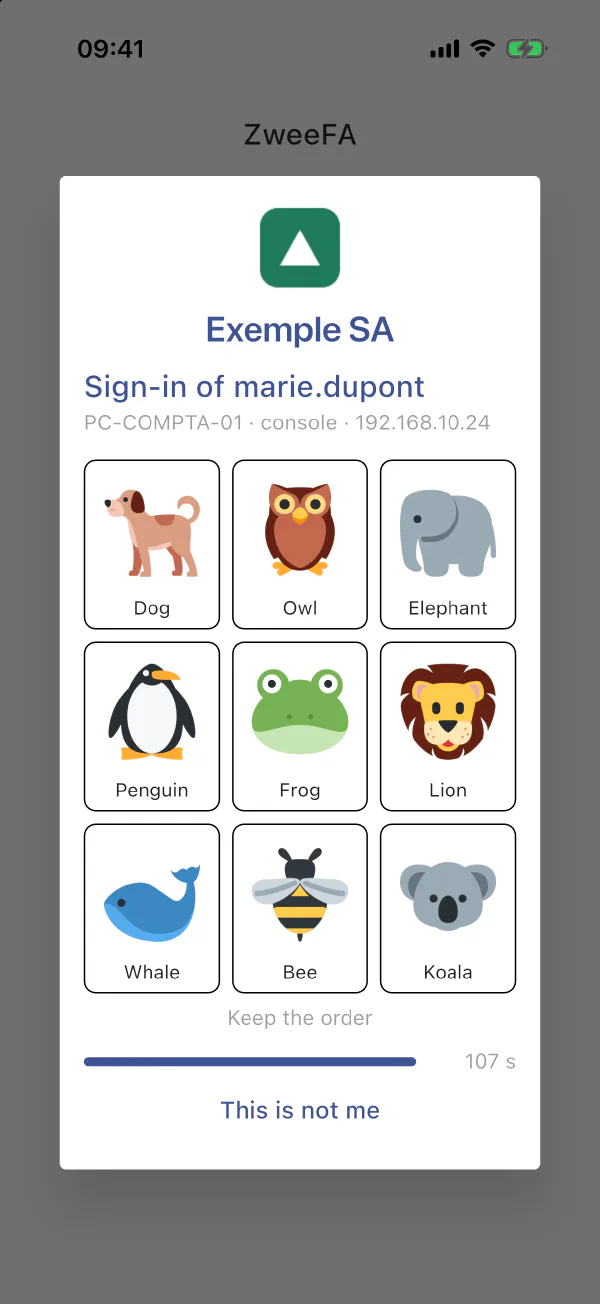
- Your phone shows a grid of 9 images, with your company’s name and logo, the account and the computer.
- You tap the two images, in order. Your phone confirms with your face, your fingerprint or its passcode. You are signed in.
Animals are just an example. Flags, pictograms, numbers, or images in your company’s own style: anything is possible.
Why a grid rather than an “Approve” button
- No more approving out of habit. A button gets tapped without thinking, even when someone else is signing in. With the grid you need to see the Windows screen: a remote attacker cannot get you to approve their sign-in.
- An answer signed by the phone. Every answer is signed by a key locked in the phone’s security chip, and every signature requires your face, your fingerprint or the phone’s passcode.
- “This is not me”. A request you did not expect? One tap reports it: the administrator is alerted and the account can be locked temporarily.
- The right computer, the right account. The request shows the account and the computer: you know what you approve.
What ZweeFA protects
- Windows sign-in: signing in to the computer.
- Remote Desktop (RDP): remote connections.
- UAC elevation: requests for administrator rights.
- Offline: without a network, backup codes stored encrypted in the app let you sign in.
Your data stays with you
- Server in your infrastructure. Accounts, keys and history never leave your network.
- Notifications without content. The notification goes through the Lux-World PC relay. It carries no name, no computer and no sign-in details: the app fetches the request directly from your server.
- Your own channel, if you prefer. Notifications can use a channel dedicated to your company instead of ours.
- In your name. The request shows your company’s name and logo.
The ZweeFA app
- iPhone, iPad and Android.
- Lock with Face ID, Touch ID or fingerprint.
- Keys and backup codes encrypted on the device.
- No ads, no usage analytics, no automatic crash reporting.
- Also: one-time codes (TOTP) for your other compatible services.
Coming soon to the App Store and Google Play.
Tailored to your company
Every company is different: number of users, computers, remote access, choice of notification channel. We review your situation and send you a proposal.
Already using ZweeFA?
- Add an account: scan the QR code provided by your IT department.
- New or lost phone: contact your IT department, who will give you a new QR code.
- Support: support@zweefa.lu
- App privacy policy
The ZweeFA app is based on privacyIDEA Authenticator (Apache 2.0 licence).